
LifeFlix Supported Operating Systems: Full Compatibility Guide
This page tells you exactly which version of macOS works with LifeFlix Digitizer, which connection methods are available on each, and what to do if you are on the latest OS.
macOS Monterey (12)
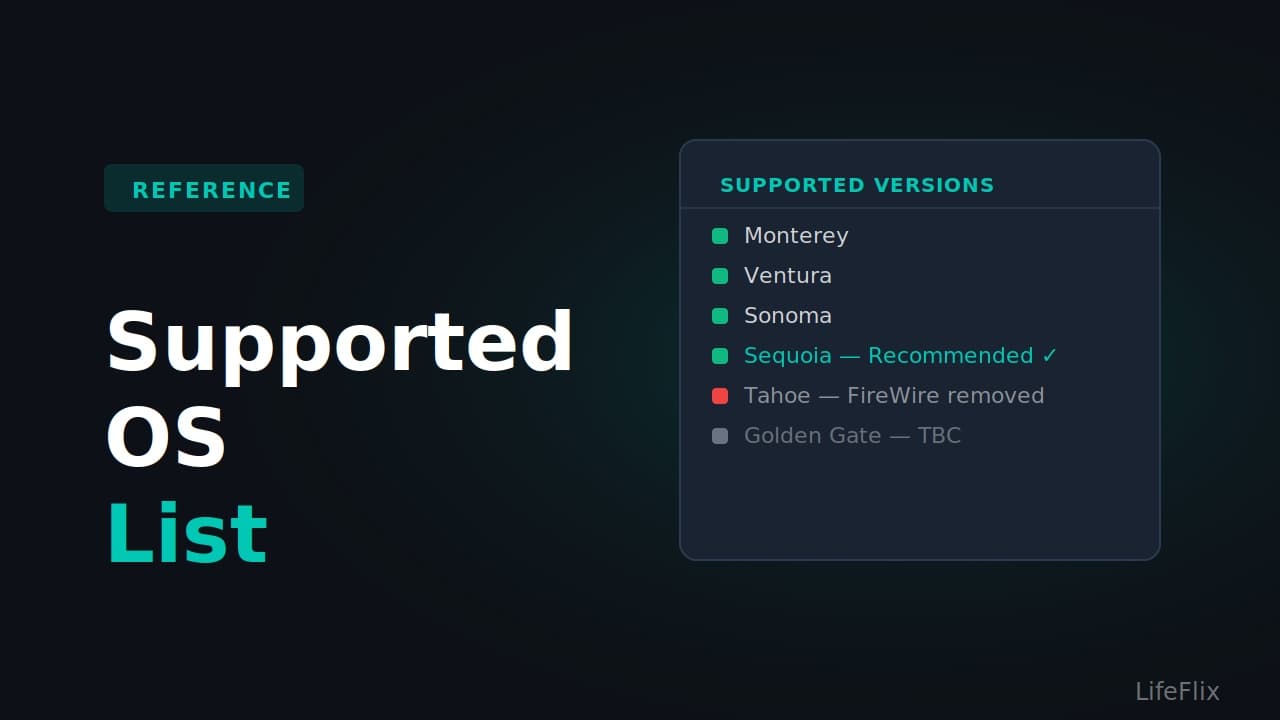
LifeFlix Digitizer: Fully supported. FireWire support: Yes, on Intel Macs with native FireWire or Thunderbolt to FireWire adapter. Apple Silicon support: Yes, with Thunderbolt adapter chain. Security updates: No longer receiving security patches from Apple as of mid 2024. Recommendation: Works well for digitising. Consider upgrading to Sequoia for continued security support, unless your Mac does not support Sequoia.
macOS Ventura (13)
LifeFlix Digitizer: Fully supported. FireWire support: Yes, on Intel Macs with adapter. Apple Silicon support: Yes, with adapter chain. Security updates: Final security update issued August 2025. No longer patched. Recommendation: Works well. Upgrade to Sequoia if your Mac supports it.
macOS Sonoma (14)
LifeFlix Digitizer: Fully supported. FireWire support: Yes, on Intel Macs with adapter. MiniDV Mac Sonoma setups work reliably with the Apple Thunderbolt to FireWire adapter on supported Intel Macs. Apple Silicon support: Yes, with adapter chain. Security updates: Still receiving security updates as of June 2026. Recommendation: Solid choice. FireWire works. Safe to stay here while digitising.
macOS Sequoia (15)
LifeFlix Digitizer: Fully supported. FireWire support: Yes. MiniDV Mac Sequoia is the most reliable modern setup for FireWire capture. The Apple Thunderbolt to FireWire adapter works consistently on Intel Macs. Apple Silicon Macs with the full adapter chain also work on Sequoia. Apple Silicon support: Yes, with adapter chain. Security updates: Still receiving security updates as of June 2026. Recommendation: The best macOS version for tape digitising in 2026. If you are on Sequoia, stay there until all your tapes are done.
macOS Tahoe (26)
LifeFlix Digitizer: Runs on Tahoe. FireWire support: No. FireWire support was removed entirely when Tahoe launched in September 2025. No driver, adapter, or workaround restores FireWire functionality on Tahoe. MiniDV camcorders will not be recognised. Apple Silicon support: FireWire via adapter chain does not work on Tahoe. USB analog capture cards for Hi8 and VHS do work. Security updates: Current and actively supported. Recommendation: Do not upgrade to Tahoe until all your tapes are digitised. If you are already on Tahoe and have MiniDV tapes remaining, use a second Mac running Sequoia for the capture step.
macOS Golden Gate (27) - Expected Late 2026
LifeFlix Digitizer: Compatibility to be confirmed. FireWire support: Will not return. FireWire is gone from macOS permanently. Intel Mac support: None. Golden Gate will be Apple Silicon only. Recommendation: If you have an Intel Mac still running Sequoia for digitising, this change does not affect you. Keep it on Sequoia indefinitely for capture work.
Quick Reference
macOS Monterey: LifeFlix runs, FireWire works, no longer security patched macOS Ventura: LifeFlix runs, FireWire works, no longer security patched macOS Sonoma: LifeFlix runs, FireWire works, security patched macOS Sequoia: LifeFlix runs, FireWire works, security patched, recommended macOS Tahoe: LifeFlix runs, FireWire removed, do not upgrade before digitising macOS Golden Gate: TBC, FireWire will not return, Apple Silicon only
Most Popular
Join Our LifeFlix Community
Enter Your Email Address to Sign Up for Exclusive Updates!
Related Guides
Exporting to NAS
Exporting to NAS - How to export your digitised footage directly to a NAS drive. Covers mounting, connection types, recommended devices, and best prac...
Read More ➜
End of Tape Marker Explained
End of Tape Marker Explained - LifeFlix stopped and said end of tape. Here is what that marker means, when it appears early, and what to do about it.
Read More ➜