
Inside LifeFlix Today: A Deep Dive Into Current Features
Everything LifeFlix V5 can do for your media management right now.
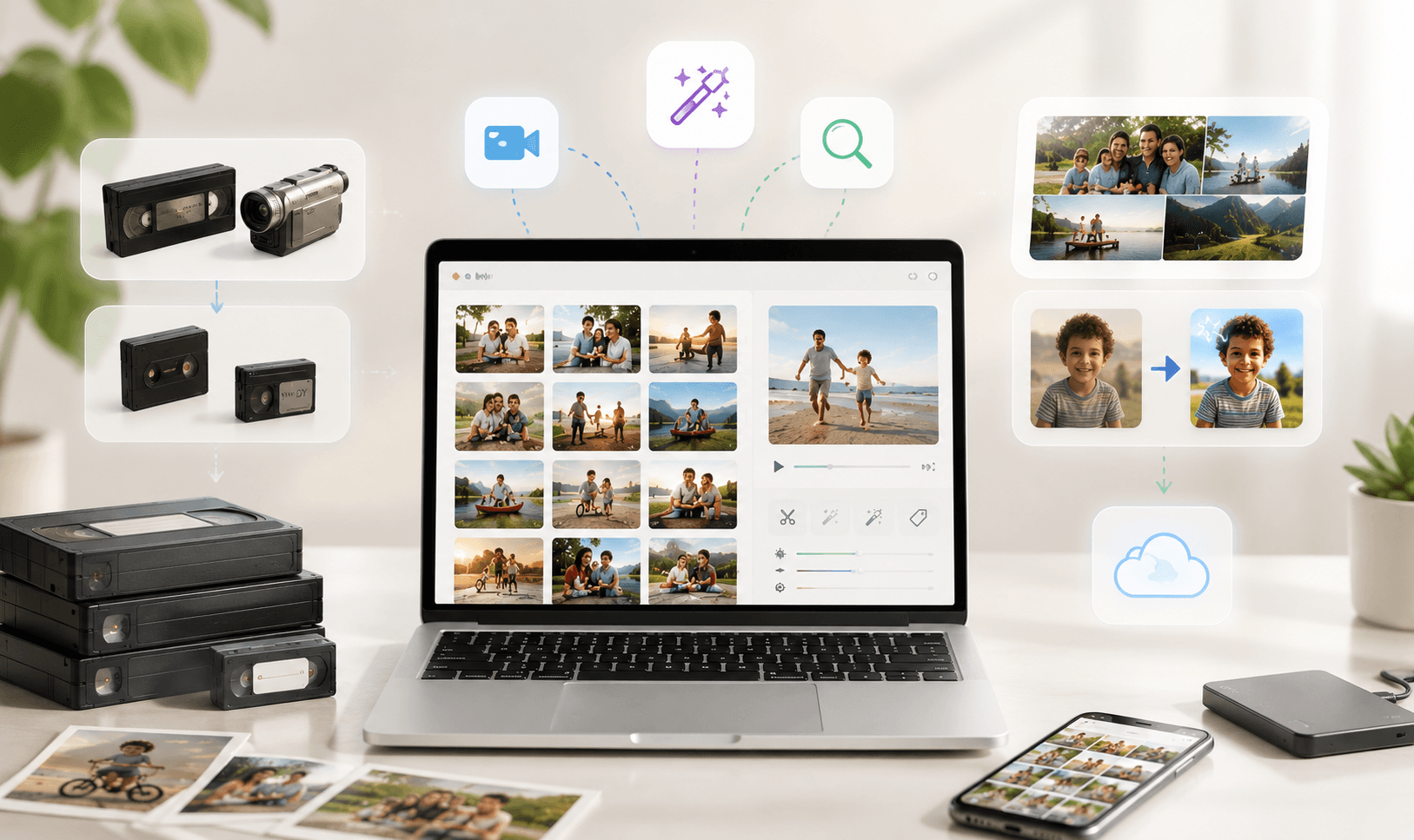
LifeFlix V5 is the culmination of years of refinement, purpose-built for Mac users who want to digitize, organize, and enhance their cherished home videos. For anyone searching for the best Mac editing software or best media management software, LifeFlix sits in a category of its own. The current feature set spans three major categories, and together they form one of the most complete legacy video solutions available on macOS.
1. Capture, Digitization & Editing
At its heart, LifeFlix was built to solve one specific problem: how do you get old tapes into your modern digital life? The answer lies in its powerful capture and digitization.
Tape Digitization
LifeFlix supports a wide range of legacy formats, including VHS, MiniDV, HDV, Video8, Hi8, and Digital8. Whether you are working with decades-old VHS cassettes or more recent MiniDV tapes from the early 2000s, this Mac video editor handles them all with ease, preserving every frame in full fidelity.
Import via FireWire & USB
The app connects directly to legacy camcorders and decks via FireWire and USB, the two dominant connection standards for analog and early digital video equipment. This hardware-level integration ensures a stable, reliable import pipeline, critical when dealing with irreplaceable footage.
Apple’s newer operating systems have introduced important limitations for legacy video workflows. macOS 16 (Tahoe) and newer versions do not support FireWire connectivity. As a result, DV importing from MiniDV and other FireWire-based camcorders is currently not possible on macOS 16 (Tahoe) or later. However, existing library management, organization, AI tagging, smart search, viewing, and other media management features remain fully functional for users managing their existing media collections.
Verify System Compatibility
• Ensure your Mac is running macOS 10.7 or later
• LifeFlix Version 3 supports macOS 10.7 (Lion – 2011) and above
• LifeFlix Versions 4 and 5 support macOS 12 (Monterey – 2021) and above
Please note that the advanced library and media management features referenced throughout the current product roadmap are available for LifeFlix V5 and newer versions only.
Real-Time Capture UI
As footage is being captured, LifeFlix provides a real-time preview interface so users can monitor what is being recorded. This eliminates guesswork and allows you to catch any issues like poor tape condition or dropped frames as they happen, rather than discovering them after a long capture session.
Crash Recovery (Orphaned Folder)
Digitizing long tapes can take hours, and unexpected interruptions can be devastating. LifeFlix includes a crash recovery system that rescues orphaned capture folders, ensuring that even an interrupted session does not mean lost footage.
2. Organization & Viewing
Preserving footage is only half the battle. Once you have it, you need to be able to find it, browse it, and enjoy it. LifeFlix offers a suite of organizational tools that turn a scattered collection into a proper digital media storage system, which is structured, searchable, and beautifully presented.
Collections & Grouping
Users can organize their videos into collections, think of them as albums for your video library. Group footage by year, by family member, by holiday, or by any logic that makes sense to you. This flexible grouping system makes navigating large libraries intuitive and deeply personal.
Multiple Views & Albums
LifeFlix offers multiple ways to view your library, from grid-based thumbnail views to list views that surface more metadata at a glance. Albums allow for even more curated, shareable groupings within the broader library structure.
Photo Viewer
Beyond video, LifeFlix includes a built-in photo editor and Mac-style viewer that lets you browse and manage still images alongside your video content. This makes it a genuinely unified media library rather than a single-format tool.
Smart Search
Finding a specific clip in a large library should not require scrolling through hundreds of thumbnails. LifeFlix's smart search lets you locate content quickly and intelligently, powered by the metadata and AI tagging systems built into the platform.
3. AI, Editing & Enhancement
This is where LifeFlix V5 makes its boldest statement. The integration of AI tools into the workflow is what separates it from every other video editing tool aimed at Mac users. It is not just a digitizer with a trimmer bolted on; it is a genuinely intelligent media platform.
Basic Editing Tools
The app includes essential video editing tool capabilities: trim and split, color and exposure adjustment, sharpness and vibrance controls. You can clean up your imports and fine-tune the look of old footage without needing a separate editor.
Instant Previews
Any edit or enhancement is reflected in an instant preview, so you can see exactly what your changes will look like before committing. This non-destructive workflow keeps your originals safe while making experimentation fast and risk-free.
AI Enhancement & Upscaling
One of LifeFlix's most impressive capabilities is its AI-powered video enhancement. Old footage shot in standard definition can be upscaled to HD or even 4K resolution, making it suitable for modern displays. The AI analyzes each frame and intelligently reconstructs details that would otherwise be lost.
AI Tagging
Rather than manually labeling every video, LifeFlix uses AI tagging software to automatically tag content based on what it detects, such as people, places, activities, and scenes. This automated ai tagging of photos and videos creates a rich metadata layer that powers smarter search without any manual effort, making it one of the most practical uses of ai tagging photos technology available in a consumer app.
AI Search
Building on the ai tagging system, the search experience goes beyond simple keyword matching. You can search for content using natural, descriptive language, and the AI will surface relevant clips even if you did not manually label them.
Advanced Metadata
For power users, LifeFlix offers detailed metadata editing, attaching dates, descriptions, locations, and structured information to your videos. This functions as a full video metadata editing software layer within the app, making your library more discoverable and preserving vital context for future generations.
4. Sharing, Photo Backup & Cloud Integration
LifeFlix also makes it easy to share finished videos across macOS's native ecosystem. AirDrop, Photos, and YouTube. For long-term photo backup and photo backup storage, LifeFlix integrates seamlessly with Google Drive and Apple iCloud, turning the app into a comprehensive photo cloud storage management hub. Native support for both MOV and MP4 ensures your videos remain playable no matter how the technology landscape evolves.
Start your media management journey today!
Subscribe to lifeflix.com
Most Popular
Join Our LifeFlix Community
Enter Your Email Address to Sign Up for Exclusive Updates!
Own your
memories
forever
withLifeFlix!
Related Guides
Exporting to NAS
Exporting to NAS - How to export your digitised footage directly to a NAS drive. Covers mounting, connection types, recommended devices, and best prac...
Read More ➜
End of Tape Marker Explained
End of Tape Marker Explained - LifeFlix stopped and said end of tape. Here is what that marker means, when it appears early, and what to do about it.
Read More ➜
