
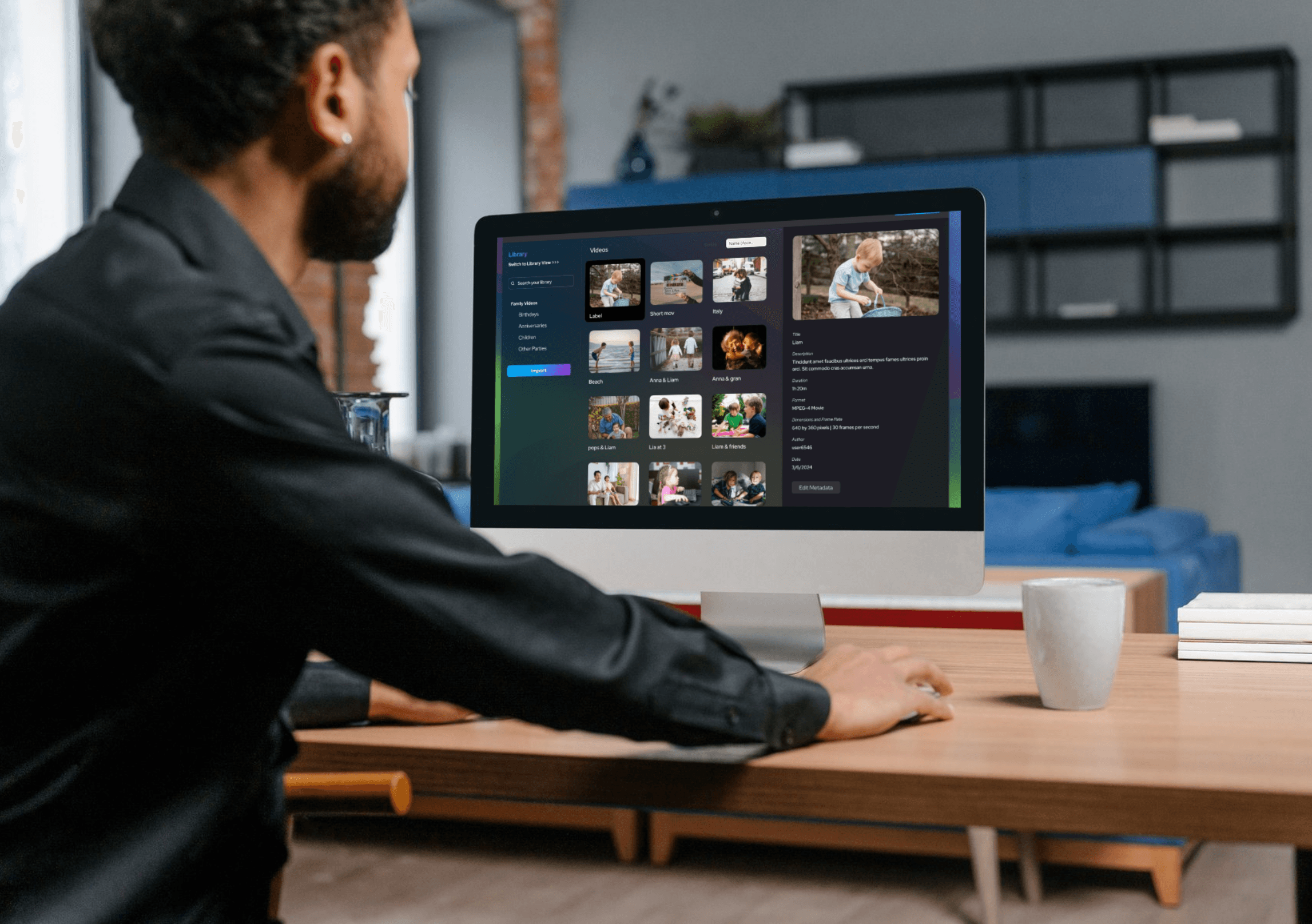
How LifeFlix Library Simplifies Photo & Video Storage on Mac
Managing photos and videos on a Mac is harder today than ever. Between iPhone footage, digital cameras, GoPros, social media downloads, and years of legacy tapes, most Mac users end up with scattered media, duplicate files, missing metadata, and overloaded iCloud storage. Even with built-in macOS tools or popular editors like iMovie or DaVinci Resolve, there’s still no true media library designed to organize, preserve, and intelligently manage decades of digital and physical footage.
LifeFlix Library is built to solve exactly that. Instead of being just another Mac photo and video editor, it functions as a complete Mac media library, optimized for importing, organizing, tagging, and storing large photo and video archives—locally, securely, and efficiently.
Below is a deep look at how LifeFlix Library simplifies digital photo storage, digital video storage, and overall media management on macOS, making it a perfect companion to tools like iMovie, Final Cut Pro, and DaVinci Resolve.
A Smarter Media Library for Mac Users
Most Mac users rely on Finder folders, iCloud, or Photos.app to manage photos and videos. But these tools struggle with:
- Mixed media from tapes, iPhone, Finder
- Missing dates or corrupted metadata
- Fragmented storage across drives and clouds
- Slow search and manual tagging
- Large libraries spanning 10–20 years
LifeFlix Library brings simplicity through a unified media management tool for macOS that supports:
- Automatic organization by date, format, or device
- Local AI tagging for scenes, objects, and people
- Metadata edit
- Fast scrubbable previews
- Consolidated storage to keep the library clean and secure
It’s more than a viewer—it’s the central hub for your entire media history
Import Everything: From iPhone to VHS to Finder
While most Mac video editors only import digital files, LifeFlix Library uniquely supports:
✔ iPhone and modern camera footage
✔ Finder folders and external drives
✔ Legacy tapes:
- VHS
- Hi8 / Video8
- MiniDV
- HDV
For anyone digitizing home movies, this is the only Mac media tool that handles both tape capture and digital file management in the same library. During captures, LifeFlix’s Orphaned Media Recovery ensures damaged tapes don’t lose scenes—something even professional editing tools can’t do.
AI Tagging Makes Searching Instant
A massive photo and video archive only works if you can find things instantly.
LifeFlix Library uses on-device AI, meaning:
- No cloud uploads
- No privacy risks
- Fast processing
- No extra subscription
The AI automatically generates:
- Scene categories (beach, outdoors, pets, travel, sports)
- Camera metadata
- Shot types
- Event-based grouping
Unlike traditional editors where tagging is manual, LifeFlix’s AI tagging builds a searchable database effortlessly—transforming chaotic folders into a browsable visual library.
One Consolidated Library for Long-Term Storage
Unlike cloud storage, where photos and videos get compressed, duplicated, or split across multiple services, LifeFlix Library creates one secure, local digital media storage system on your Mac.
Benefits:
- Faster access
- Import for many platforms
- Mac Exclusive
- Values Privacy
- Easy backup to external drives
For long-term archival, local storage remains the most reliable solution—far more stable than relying solely on iCloud or Google Photos.
Whether you’re exploring the best Mac photo editor, testing new AI tools, or searching for a reliable Mac media editing tool, LifeFlix Library stands out as the only solution built specifically for photo and video storage, organization, and long-term preservation.
If you want a smarter way to manage decades of memories without relying solely on cloud storage or scattered folders, LifeFlix Library is the modern, intelligent, Mac-native solution that ties everything together.
Get it Now
Most Popular
Join Our LifeFlix Community
Enter Your Email Address to Sign Up for Exclusive Updates!
Own your
memories
forever
withLifeFlix!
Related Guides
Exporting to NAS
Exporting to NAS - How to export your digitised footage directly to a NAS drive. Covers mounting, connection types, recommended devices, and best prac...
Read More ➜
End of Tape Marker Explained
End of Tape Marker Explained - LifeFlix stopped and said end of tape. Here is what that marker means, when it appears early, and what to do about it.
Read More ➜